The Hidden Cost of LiteSpeed ESI in WordPress
You cannot optimize energy that has already been wasted

When a Tiny Fragment Carries an Entire WordPress Request
LiteSpeed ESI makes it possible to cache pages containing dynamic content. But behind a tiny ESI fragment, WordPress may still execute far more code than the fragment actually needs.
The Promise of ESI
Page caching is one of the most effective ways to reduce server-side processing. Instead of generating the same HTML document repeatedly, a web server can deliver an already generated version.
But there is a fundamental limitation: not every part of a webpage is suitable for caching.
Consider a WooCommerce store. While product descriptions, images, and navigation are largely identical for different visitors, a shopping cart is individual. Its contents may change from one request to another.
This is where Edge Side Includes (ESI) comes into play.
LiteSpeed ESI allows a webpage to be divided into separately processed fragments. Parts of the page can be cached, while dynamic or personalized fragments are handled independently.
This is a legitimate and useful solution to a difficult caching problem, particularly in ecommerce environments.
However, ESI does not make dynamic content cheaper to generate simply because that content occupies only a small part of the webpage.
And that is where things become interesting.
A Tiny Mini-Cart With an Unexpectedly Heavy Backpack
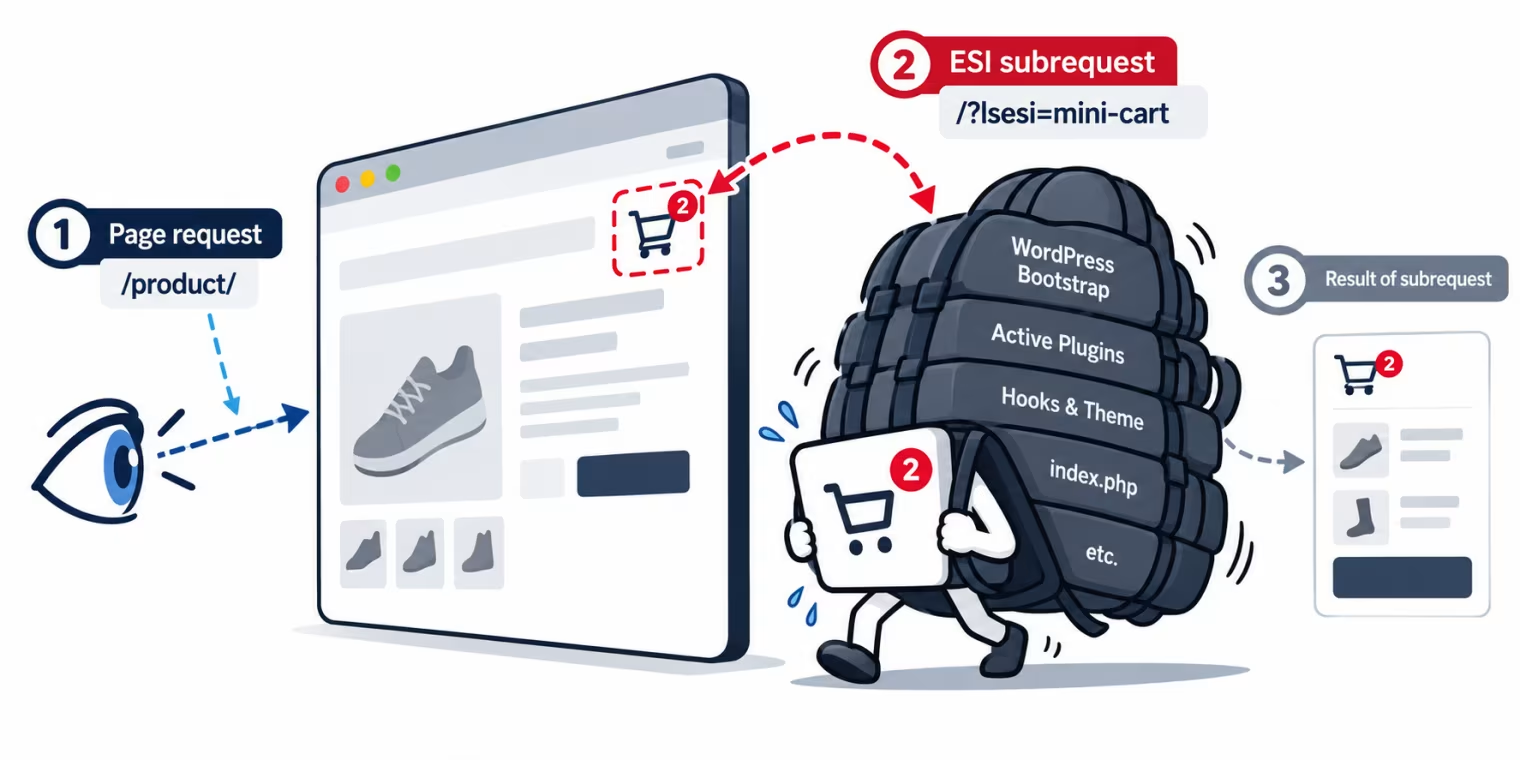
When the page is requested, LiteSpeed may handle the cart as an ESI fragment. The fragment is processed separately and contributes its HTML to the final page. From the visitor's perspective, this is an insignificant amount of content. Perhaps an icon, an item count, or a small shopping-cart summary.
From the server's perspective, however, an uncached ESI fragment can be an entirely different story. The ESI subrequest is not simply a call to an isolated function that generates the mini-cart HTML. In a conventional WordPress installation, it follows the normal WordPress request-processing path.
That means going through the application's entry point, initializing WordPress, loading the active plugins, executing relevant initialization hooks, and eventually generating the requested fragment. The final response may contain little more than a shopping-cart icon and a few lines of HTML.
But the processing required to produce that tiny result can involve a substantial portion of the WordPress application.
Think of the mini-cart as a small character carrying an enormous backpack. All it needs to deliver is a tiny HTML fragment. Yet it has to carry WordPress initialization, plugin loading, hooks, and other application overhead on its back.
The actual task is small. The baggage is not.
Why This Becomes Particularly Interesting With Page Caching
Now consider two situations.
Scenario 1: Page Cache MISS
The requested page is not available in the page cache and must be generated by the application. WordPress processes the main page request. If the page contains an ESI fragment requiring its own uncached subrequest, that fragment can trigger an additional WordPress initialization. The dynamic fragment brings its own processing costs.
Scenario 2: Page Cache HIT
This time, the main page is already cached. LiteSpeed can deliver the page without performing its regular WordPress generation. That is exactly what a page cache is supposed to accomplish.
But what happens to the ESI fragment?
If the fragment is uncached, or its own cache entry is unavailable, it still requires dynamic processing. The page cache HIT does not eliminate the need to initialize WordPress for that ESI subrequest.
The main document may be cached, while the ESI fragment continues to carry essentially the same initialization baggage.
This distinction is important.
LiteSpeed supports caching ESI fragments separately, including public and private variants. When a fragment is successfully served from its own cache, the additional PHP execution can be avoided. But for fragments that actually require dynamic generation, the underlying WordPress initialization cost remains. And where multiple uncached ESI subrequests are involved, that cost can accumulate. The result is a situation that may surprise many WordPress administrators:
A webpage can be delivered with a perfectly valid Page Cache HIT while still generating considerable PHP execution load behind the scenes.
ESI Is Not the Cause of the Problem
It would be easy to blame LiteSpeed ESI for this overhead.
But that would miss the more fundamental issue. ESI is doing what it was designed to do: allowing separately processed content to be included in a webpage. The real problem exists independently of ESI.
WordPress normally loads its active plugins without first determining whether each plugin is needed for the current request.
A product page, an AJAX request, a REST API request, and an ESI subrequest can have completely different functional requirements. Nevertheless, they ordinarily enter the same WordPress application initialization process. A plugin that is essential for one request may be irrelevant to another. Yet it can still be loaded, register hooks, initialize classes, and perform other work.
Not every plugin executes all its functionality on every request. But that does not eliminate the costs of loading and initializing code that the request does not need. This is not exclusively a WordPress phenomenon. Other PHP-based CMS and framework architectures can encounter similar problems when different request types are processed through a common application bootstrap without sufficiently early, context-specific execution decisions.
ESI merely makes the consequences particularly visible. A tiny fragment can require a disproportionately large amount of application initialization. The deeper problem is not the size of the generated HTML.
It is the amount of code executed to generate it.
Why Other Fragment Techniques Do Not Automatically Solve This
ESI is not the only way to handle dynamic content within otherwise cacheable pages.
Applications may use AJAX requests, client-side rendering, fragmented caching, or other mechanisms to retrieve or update dynamic content independently. These techniques have their own advantages and disadvantages. But they share an important limitation when they invoke the same application bootstrap:
Changing how a fragment is requested or delivered does not automatically change how much application code must execute to produce it.
An AJAX request that initializes the entire CMS merely moves the dynamic operation to another HTTP request. A different fragment-loading mechanism can change when and where processing occurs, without necessarily reducing the underlying initialization cost. Separately cached fragments can avoid repeated generation, but only when a reusable cached result is available.
A purpose-built lightweight endpoint could bypass much of the normal application initialization. However, that requires a different execution architecture and suitable access to the functionality and state needed by the fragment. It is not a universal, drop-in solution for arbitrary existing WordPress plugins.
The distinction is simple:
Avoiding repeated execution and avoiding unnecessary execution are two different optimization strategies.
Page caching primarily addresses the first. The second requires examining what the application actually needs to execute.
The WP-Rush Principle: Don't Use What You Don't Need
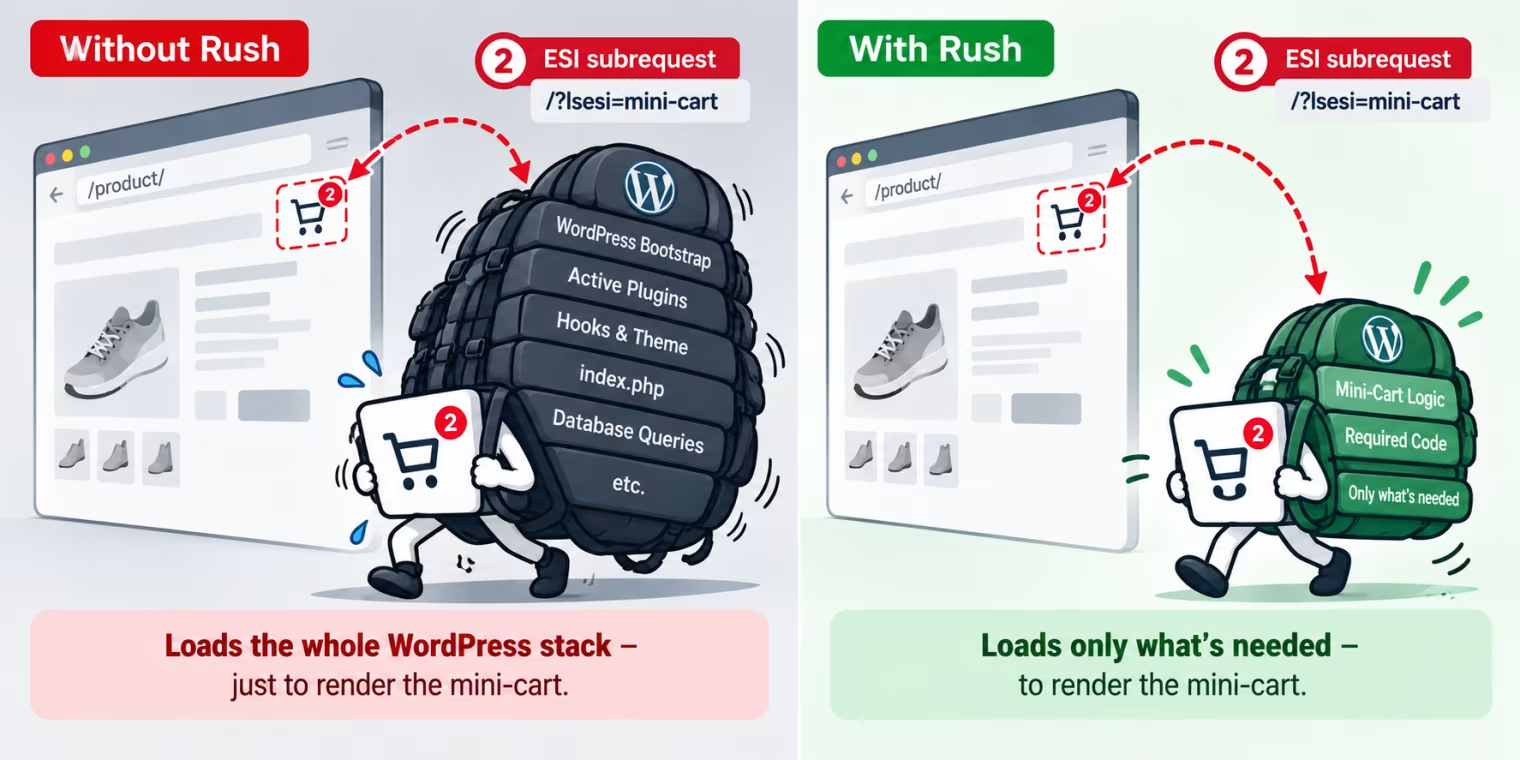
Instead of asking how to cache the result of a request, WP-Rush asks a question much earlier:
Which plugins does this request actually need?
WordPress normally loads its active plugins during application initialization. WP-Rush introduces a context-dependent plugin-loading decision before that unnecessary loading takes place. For LiteSpeed ESI, this is particularly relevant. LiteSpeed's WordPress integration identifies ESI requests through the lsesi query parameter.
WP-Rush can recognize that request type early and associate it with a dedicated ESI execution context. This does not require knowing the original product-page URL. Instead, it allows a plugin configuration specifically suited to ESI processing.
There is an important distinction: a shared ESI context does not automatically identify the individual requirements of every possible ESI fragment. The configured plugin set must therefore accommodate the ESI functionality actually used by the website.
But it no longer has to be identical to the plugin set used for every normal WordPress request. Plugins required to generate the ESI content remain available. Plugins irrelevant to that request can be excluded from loading. The ESI request still exists.
The required WordPress core initialization still exists. And the mini-cart still performs its intended function.
What changes is the unnecessary plugin baggage carried along the way.
The Difference Between Faster Execution and Avoided Execution
Most familiar performance optimizations attempt to make existing operations more efficient. Database queries can be optimized. Object caching can reduce repeated data retrieval. PHP execution can benefit from opcode caching. Page caching can avoid generating complete documents repeatedly.
All of these approaches have their place. But they usually address processing that has already been accepted as necessary, or attempt to avoid repeating its result.
WP-Rush addresses an earlier decision.
If a plugin is not needed for a particular request, why load and initialize it at all?
That question becomes especially important when additional requests are involved. An uncached ESI fragment does not necessarily need dozens of active plugins merely because the WordPress installation happens to use them elsewhere. And there is little benefit in optimizing the execution of a plugin that should not have been loaded for that request in the first place.
The principle can be summarized in one sentence:
You cannot optimize energy that has already been wasted.
Conclusion: ESI Solves a Caching Problem. WP-Rush Addresses an Execution Problem.
LiteSpeed ESI deserves recognition for what it provides.
It enables combinations of cacheable and dynamic content that would otherwise be difficult to handle efficiently with conventional full-page caching. But ESI should not be confused with an optimization of the underlying PHP application initialization. When an ESI fragment requires uncached dynamic processing, its small HTML output does not guarantee a small server-side workload.
The same applies to other fragment-generation techniques that rely on the regular WordPress bootstrap. The resulting overhead is a consequence of how the application processes requests, not a flaw unique to LiteSpeed. WP-Rush addresses a part of that problem that page caching and fragment delivery cannot resolve on their own: unnecessary plugin loading and execution.
It does not eliminate every initialization cost. It does not eliminate ESI subrequests. And it does not change the fundamental purpose of ESI. It makes those requests more selective about the code they carry. The result is not a different mini-cart.
It is the same mini-cart with a lighter backpack.
And that is the principle behind WP-Rush:
Don't use what you don't need.
Technical references
- LiteSpeed Cache for WordPress — Cache and ESI documentation
- LiteSpeed Cache — ESI Developer Guide
- LiteSpeed Cache for WordPress — ESI implementation
- WordPress Core — wp-settings.php
More interesting Posts
- WordPress - Why Performance Doesn't Start With Optimization
- The Great Deception: Why Google PageSpeed Doesn’t Measure Speed
- WordPress - Optimization for Nothing and the Speed (Not) for free
- WP-Rush - The Unique Selling Point to make a WordPress Agency successful. (really)
- WordPress: Do Optimization Plugins really optimize?
- The WordPress Optimization Paradox: Why Your PageSpeed Strategy Might Be Hurting Your Performance
- Webpage Performance Starts Before Optimization
- What Is WordPress Performance by Prevention?
- WP-Rush Speed Guide for WordPress in 2026 - Performance by Prevention
- Is WordPress Optimization Mostly Post-Processing?
- WordPress - Does Caching Hide Architectural Inefficiency?
- WordPress - Are Performance Plugins Solving the Wrong Layer?
- WordPress - Why TTFB and Lighthouse Scores Don’t Measure the Same Problem
- Is WooCommerce Checkout Speed a Structural Issue?
- WordPress - The Hidden Cost of Universal Plugin Bootstrapping
- WordPress - On-Demand Asset Loading vs. Preventive Execution Control
- Does Dynamic in WordPress Mean Inevitable?
- WordPress - The Mathematical Overhead of Late Optimization
- What Would a Preventive WordPress Architecture Look Like?
- Is Database Optimization Overestimated in WordPress Performance?